Bulk QR Code Generator
Generate Thousands from Excel or CSV
Upload a spreadsheet, customize each code's color and size, and download everything as a ZIP in seconds. PNGs are free, SVGs come with Pro. No software to install, no setup required.
Custom QR Code Maker with Brand Colors
Create Custom QR Codes in Any Color to Match Your Brand Identity
Many businesses and event organizers need to generate QR codes quickly to keep their workflow smooth and efficient. You can create customized QR codes in a single batch with per-row color settings, or in multiple batches with an Excel file. Every code in your batch can have its own unique hex color by using our built-in color picker to create brand-matched QR codes for product labels, business cards, and event tickets.

Blue

Black (default)

Green
.webp)
Red
Understanding Bulk & Batch QR Code Generation
What Is a Bulk QR Code Generator?
Manually creating QR codes for large datasets can be frustrating, but it doesn't have to be. Our bulk QR code generator is an online tool that reads data from an Excel, CSV, or plain-text file and converts each row into a unique, scannable code. Whether you need 10 codes or 10,000, the process takes seconds.
Each code can encode URLs, plain text, UPI payment links, email addresses, phone numbers, PDF links, and GPS coordinates — all in a single batch.
The output is an organized ZIP file containing every generated code, named, sized, and color-coded exactly as defined in your uploaded spreadsheet. All codes comply with the ISO/IEC 18004 standard for universal scan compatibility across smartphones, tablets, barcode scanners, and dedicated QR code readers.
Businesses use it for product packaging, event ticketing, inventory and warehouse management, restaurant menus, marketing campaigns, business cards, educational materials, and certificate verification. It covers every situation where unique codes are needed at scale. See our step-by-step guide for a full walkthrough of the QR code creation process.
Your Excel file rows →
→ 10,000 unique codes ready
All packaged into one ZIP file · Ready to download
Core Capabilities
Bulk QR Code Generator Features for Fast Batch Creation
It is designed for speed, scale, and simplicity. Every feature is built around one goal: turning your spreadsheet data into scannable codes as fast as possible.
Excel, CSV & Google Sheets Upload
Upload structured data from Excel (.xls, .xlsx), Google Sheets export, or plain text. Our parser handles headers, mixed data types, and large files automatically. It's one of the fastest ways to generate QR codes from spreadsheet data.
Custom QR Code Colors & Branding
Apply your brand palette to every code. Set a global hex color or control each one individually per row. Create QR codes with logo-matching colors for product labels, business cards, and marketing materials.
Instant ZIP Download: PNG & SVG
All generated codes are packaged into a single ZIP file. Export as PNG (Free plan) or SVG (Pro & Business) for high-quality printing on packaging, banners, stickers, and signage.
Multiple Data Types in One Batch
Encode URLs, plain text, UPI payment links, email addresses, phone numbers, and location data. Mix different data types across rows in a single upload.
Privacy-First Server Processing
Files are processed securely and automatically deleted after generation. If you create an account, your generated files and history are saved in your dashboard for easy access and re-download.
ISO/IEC 18004 Compliant
All codes comply with the ISO/IEC 18004 standard for universal scan compatibility across smartphones, tablets, barcode scanners, and dedicated QR code readers.
3 Simple Steps
How It Works — Excel to QR Codes in 3 Steps
Create thousands of QR codes in just 3 simple steps using your Excel or CSV file. No technical expertise needed.
Upload Your Excel or CSV File
Each row in your spreadsheet becomes one unique QR code. Add optional columns for filename, hex color, and pixel size to control every code individually. Supports .xlsx, .xls, .csv, and plain text files.
Customize Colors, Size, and Format
Choose your preferred size, foreground color, error correction level, and output format — PNG for web and digital, SVG for print and packaging. Apply settings globally or override per row in your spreadsheet.
Download All QR Codes in One ZIP File
Click generate. The server processes your entire dataset and packages every QR code into one organized ZIP file — ready to download in seconds, whether your batch has 10 codes or 10,000.
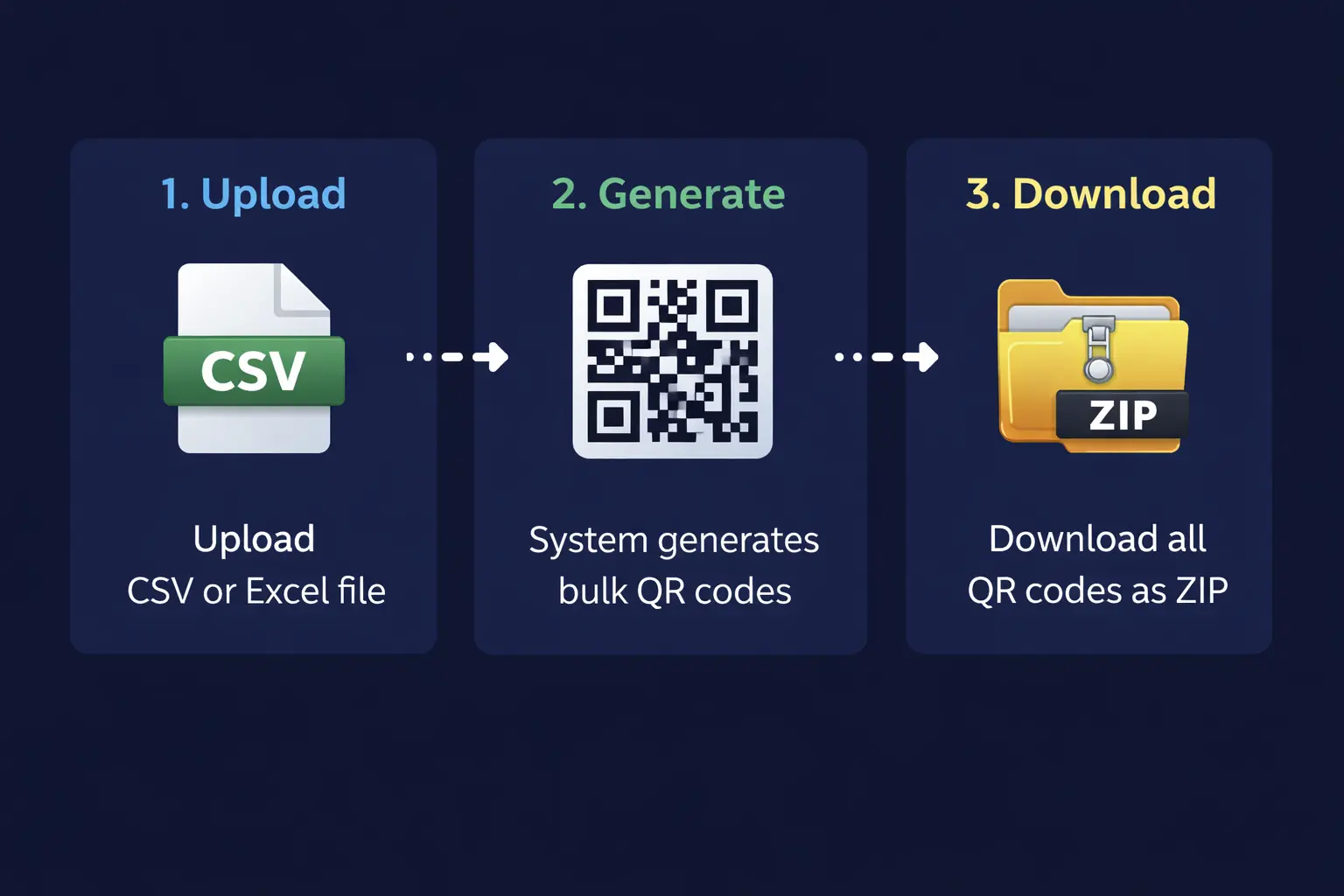
No account registration, software installation, or technical expertise required.
Watch It in Action
Watch: Generate Thousands of QR Codes from a Spreadsheet in Under 60 Seconds
Watch the full process from upload to download — no technical knowledge needed.
Opens on YouTube · Under 75 seconds
Data Preparation
Bulk QR Code Generator Excel & CSV File Setup Guide
Are you worried about setting up a CSV or Excel file for batch creation? No longer need to be, as it takes only two minutes and gives you full control over every item in your batch, including individual filenames, colors, and sizes.
| data | filename | color | size |
|---|---|---|---|
| https://store.com/p/001 | product_001 | #0057ff | 300 |
| https://store.com/p/002 | product_002 | #00b050 | 300 |
| Ticket · John Smith | ticket_john | #cc0000 | 400 |
| ... more rows | |||
Encode URLs, Text, Payments; More in One File
The QR code generator supports URLs, plain text, UPI payment links, email addresses, phone numbers, and more in a single upload. Each row of the spreadsheet is processed independently so that you can mix different data types across a single file without any formatting issues.
The Required "data" Column
Your file must have a column labeled data in the header row. This feature specifies which column contains the values to encode. Every row in this column generates exactly one scannable code.
Control Filename, Color & Size Per Row
Add filename, color, and size columns to control each code individually. Especially useful for large operations that require unique labeling, colors, or sizes.
Compatible Export Options
Both legacy XLS and modern XLSX Excel formats are fully supported. You can export from Google Sheets as CSV and upload directly. Files with multiple rows are processed without speed issues. Are you still confused? Download our free template to get started immediately.
Who Uses It
Who Uses a Batch QR Code Generator? Real Industry Use Cases
From product packaging to event management, see how teams across industries use batch-generated codes to save hours of manual work every week.
Product Packaging & Labels
Assign a unique scannable code to every SKU. Print QR codes as stickers or barcode labels on packaging. Link customers directly to product pages, manuals, or warranties.
Generate product QR codes →Event Tickets & Check-In
Generate a unique QR code for every attendee ticket from your registration spreadsheet. Speed up check-in, eliminate counterfeit entries, and maintain digital attendance records.
Create event ticket codes →Print Marketing & Campaigns
Run trackable print campaigns with unique QR codes per flyer, poster, or mailer. Assign individual codes from a campaign spreadsheet and track scan activity.
Generate campaign QR codes →Restaurant Menus & Table Codes
Replace printed menus with scannable QR codes, one per table. Update your digital menu anytime without reprinting. Generate all table codes in under a minute from a simple spreadsheet.
Generate menu QR codes →Simple Pricing
Free vs Pro vs Business — QR Code Generator Pricing
Start free with no credit card required. Upgrade anytime to unlock advanced features, larger batch sizes, SVG export, and priority processing.
| Feature |
Free
$0 forever
|
Most Popular
Pro
$9 / month
|
Business
$25 / month
|
|---|---|---|---|
| Generation | |||
| QR Codes per Batch | Up to 500 | Up to 5,000 | Up to 10,000 |
| Daily Limit | 10/day | Unlimited | Unlimited |
| CSV / Excel / Text Upload | ✓ | ✓ | ✓ |
| Custom Colors & Sizes | ✓ | ✓ | ✓ |
| PNG Export | ✓ | ✓ | ✓ |
| Advanced Features | |||
| SVG Export | ✕ | ✓ | ✓ |
| Dynamic QR Codes | ✕ | ✓ | ✓ |
| Error Correction Control | ✕ | ✓ | ✓ |
| Priority Processing | ✕ | ✓ | ✓ |
| Account & History | |||
| Generation History | ✕ | ✓ | ✓ |
| Re-download Past ZIPs | ✕ | ✓ | ✓ |
| Support | |||
| Email Support | ✕ | ✓ | ✓ |
| Priority Support | ✕ | ✕ | ✓ |
| All plans: secure processing, ZIP download, browser-based. No hidden fees. | Sign Up Free | Get Pro | Get Business |
All plans include secure processing, ZIP download, and browser-based generation. No hidden fees. See full pricing details →
Common Questions
Frequently Asked Questions About QR Code Generation
Found this useful? Share it with your team.
Ready to Generate QR Codes in Bulk?
Start generating in under a minute. Free forever — no credit card, no software, no learning curve.
Free forever plan available · No credit card required · Works in your browser
Summary — Bulk QR Code Generator from Excel & CSV
Our bulk QR code generator is designed for businesses, marketers, developers, and teams. You can create data, URLs, plain text, UPI payment links, and location coordinates with a single spreadsheet. Every generated code can be customized individually. Use per-row columns in your spreadsheet to set custom filenames, hex colors, and pixel sizes for each QR code in the batch. Export your codes for print-perfect scaling on product packaging, stickers, banners, business cards, and signage. The platform works entirely in your browser, with no software installation, plugins, or command line tools. It is compatible with desktop computers, laptops, tablets, and mobile phones.
Last updated: October 2026 · System Status