Dynamic vs Static QR Code: Which One Do You Actually Need?
You print 5,000 flyers. Three weeks later, the landing page URL changes. Every code on every flyer is now dead. That is the difference between a dynamic vs static QR code, and it is the reason this decision matters before you print anything.
Some people call it the editable QR code vs fixed QR code question. The name changes. The problem is the same. This guide settles it. You will know exactly which type to use, when static is the smarter choice, and when dynamic is worth it.
Table of Contents
What Is a Static QR Code?
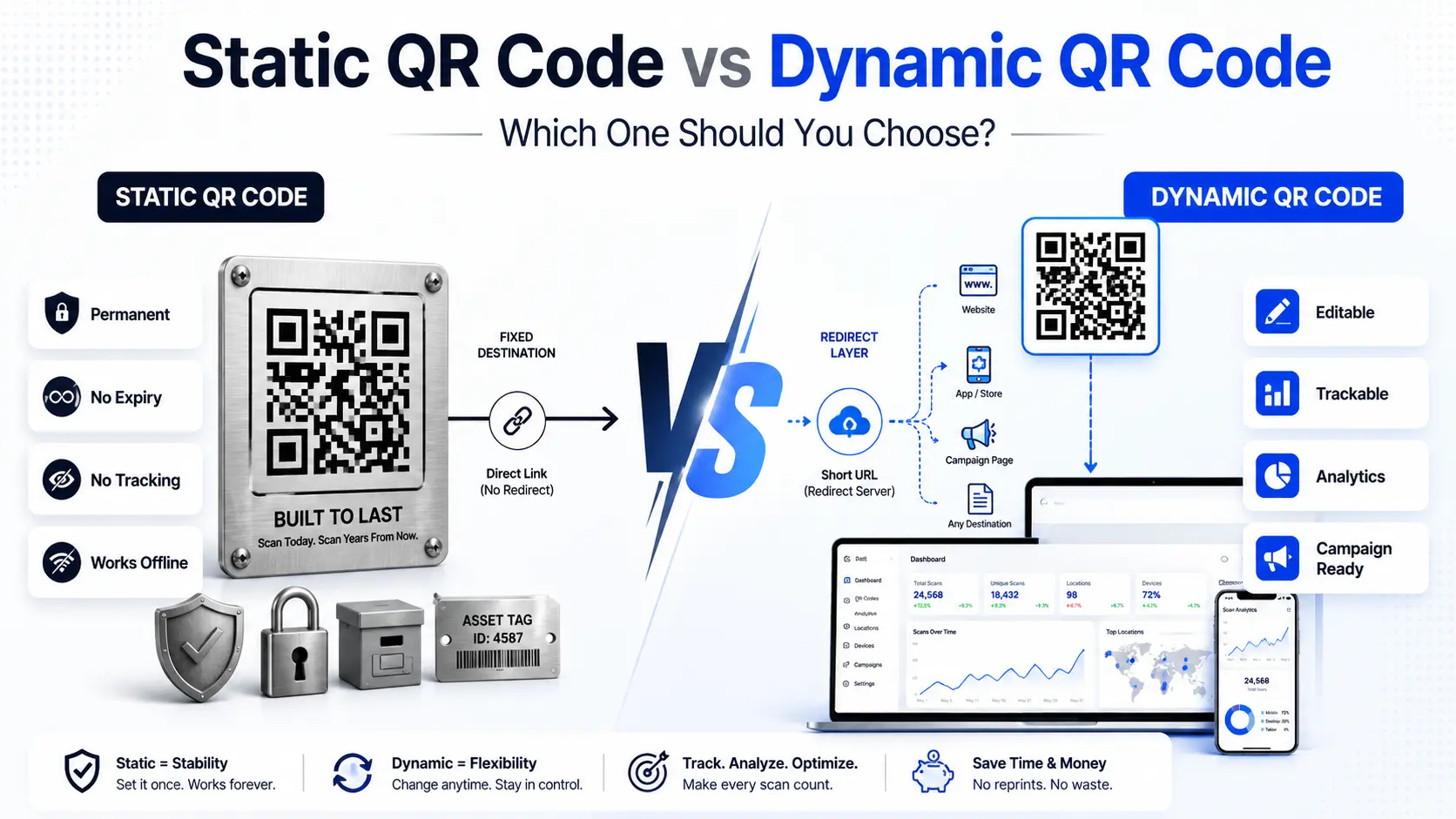
A static QR code stores data directly in its pattern. The URL, text, or phone number is encoded into the black-and-white modules at the moment of creation.
Once you generate it, that data is locked. There is no server in between. When someone scans it, their phone reads the pattern and goes straight to the destination. No redirect. No middleman. No subscription.
How Static Codes Store Data
The data lives inside the code itself. A longer URL means a denser, more complex pattern. A denser pattern can be harder to scan, especially when printed small.
This is why short URLs work better in static codes. Tools like Bitly or your own domain’s short links keep the pattern clean and fast to scan.
Static codes work without an internet connection on the scanner’s end, as long as the destination does not require one. That matters for asset tags in warehouses, offline manuals, or physical product labels.
When Static Makes Sense
Use a static QR code when the destination will never change.
Good use cases include:
- Wi-Fi login credentials printed on a card
- Plain text on a product label or certificate
- Asset tags on equipment that must work for 10 or 20 years
- Book pages linking to companion resources that will not move
- Archival materials where vendor dependency is not acceptable
A static code built to the ISO/IEC 18004 standard, the international specification governing QR code structure, will scan reliably for decades, with no third-party service required. That matters when you are labeling equipment that needs to outlast every software subscription you will ever buy.
What Is a Dynamic QR Code?
A dynamic QR code does not store the final destination. It stores a short redirect URL, usually a few characters long, that points to a server you control.
When someone scans it, their device hits that redirect server. The server checks where the code currently points and forwards the user there. The whole process takes milliseconds. The printed code never changes. The destination behind it can change at any time.
How QR Code Redirects Work
Think of it like a forwarding address. You move house. The post office redirects your mail to the new address. The sender never needs to update anything. A dynamic QR code works the same way. Your printed flyer stays the same. You update the destination in your dashboard, your QR code management platform handles the rest.
Every scan from that point forward to the new page. This is how Scanova, QRCodeKit, and Supercode all handle dynamic codes. The short redirect URL is hosted on their infrastructure. You control the destination through a dashboard; the code itself never changes.
What You Can Do With a Dynamic Code
The redirect layer opens up capabilities that static code simply cannot offer. You can edit the destination URL after printing. If your campaign landing page changes, you fix it in your dashboard in under a minute, no reprint. You can track every scan. Most QR code management platforms log the scan count, timestamp, device type, and approximate location.
These trackable QR code benefits are what separate a printed campaign you can measure from one you are running blind. Every scan becomes a data point: when it happened, where it happened, and on what device. You can add UTM parameters. Tag your destination URL with utm_source, utm_medium, and utm_campaign values. Every scan then shows up as a labeled session in Google Analytics 4.
You can run A/B tests. Split traffic between two landing pages from one printed code. See which version converts better before committing to a full print run. You can route by device. Send iOS users to the App Store and Android users to Google Play automatically from a single code.
The One Real Limitation
Dynamic codes depend on the redirect service staying active. If the platform shuts down or your subscription lapses, the redirect stops working. The printed code becomes dead. This is not a theoretical risk; it has happened with smaller QR providers.
The mitigation is simple. Use an established provider with a clear policy on code longevity. Check whether the free tier keeps codes active indefinitely or expires them after a trial period. Some platforms, including QR-Verse, explicitly state that dynamic codes do not expire even on the free tier.
Dynamic vs Static QR Code — Side-by-Side Comparison
| Feature | Static QR Code | Dynamic QR Code |
| Editable after printing | No | Yes |
| Scan tracking | No | Yes |
| UTM / analytics support | No | Yes |
| Works without internet | Yes | No — needs redirect server |
| Expiry risk | None | Yes, if provider lapses |
| Cost | Free | Free to paid |
| Best for | Permanent, fixed data | Campaigns, print materials |
When to Use Dynamic QR Codes
Print Campaigns and Marketing Materials
If you are printing flyers, posters, direct mail, or brochures, use dynamic. Marketing campaigns change. Landing pages get renamed. Offers expire. A static code locks you into whatever URL existed on print day. With a dynamic code, you can update the destination mid-campaign.
You can redirect users to a new offer page. You can even swap in a completely different campaign without touching the printed materials. Consider the numbers. A business that prints 10,000 trifold flyers at $0.18 each is looking at a $1,800 print job. If the landing page URL changes three weeks later, a static code turns that entire run into waste. A dynamic code turns it into a 30-second dashboard update.
Bulk QR Code Generation for Products and Packaging
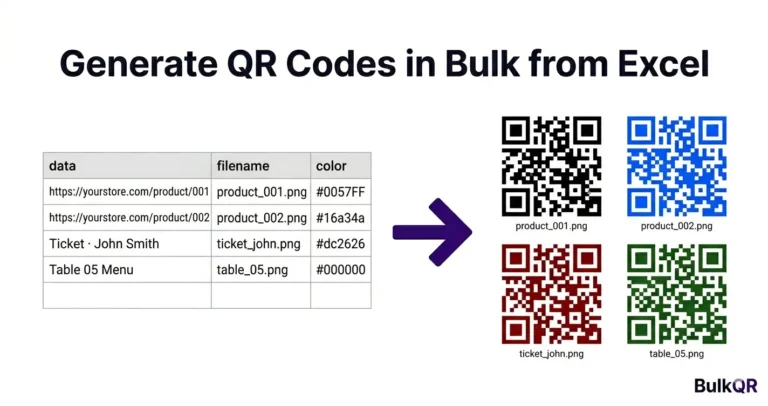
This is where dynamic codes become genuinely powerful at scale. Tools that support bulk dynamic QR generation from spreadsheets assign a redirect layer to each row. Every code in the batch gets its own live control point. If a product page URL changes, a seasonal promotion ends, or a link breaks, you fix one redirect in the dashboard.
The entire batch updates instantly. No reprinting. No waste. For a step-by-step walkthrough of the upload and generation process, see: How to Generate Bulk QR Codes from Excel. For a full list of supported QR types and output formats, see the BulkQR features page.
Event Management and Ticketing
Venues change. Schedules shift. Last-minute updates happen. A dynamic code on an event badge or ticket lets you redirect attendees to a new room, an updated schedule page, or a check-in form, without reprinting a single badge.
Bulk dynamic codes are one of the most practical tools for event teams managing large attendee lists. The ability to update destinations after distribution is what makes the format work at scale.
When Static QR Codes Are the Better Choice
Not every use case needs to be dynamic. Use static when the data will not change. Asset labels on warehouse equipment need to work 10 years from now, without a subscription to keep them alive. A QR code on a printed textbook linking to a companion website does not need tracking. A certificate with a verification URL does not need mid-campaign redirects.
Use static when vendor independence matters. If your organization cannot accept a third-party dependency for mission-critical codes, static is the safer choice. The code works forever, on its own, with no account required. Use static for one-time campaigns. If you are printing a single-event flyer with a URL that will never change, generating static code takes seconds and costs nothing. These are the permanent QR code use cases where static consistently outperforms dynamic.
Frequently Asked Questions
Can you change a QR code after printing?
Only if it is a dynamic QR code. Dynamic codes store a short redirect URL that you control. You can update the destination on your dashboard at any time without changing the printed code. Static codes encode the destination directly; they cannot be edited after creation.
Do static QR codes expire?
No. A static QR code encodes data directly into its pattern. It does not rely on any server or service. As long as the destination URL remains live, the code will scan indefinitely. The code itself has no expiry date.
Do dynamic QR codes require a subscription?
It depends on the provider. Many platforms offer a free tier that keeps codes active permanently. Some expire codes after a trial period. Always check the expiry policy before printing codes at scale. BulkQR and platforms like QR-Verse are transparent about the longevity of their free tiers.
What happens if my dynamic QR code provider shuts down?
The redirect stops working, and the printed code becomes dead. This is why provider selection matters. Choose platforms with clear longevity commitments and, where possible, those that allow custom domain redirects, so you control the redirect layer even if you switch providers.
Which Should You Choose?
Three questions settle this.
Will the destination URL ever change? If yes, use dynamic. Campaigns shift. Landing pages move. Do not lock yourself into a URL on print day.
Do you need to track scan performance? If yes, use dynamic. Static codes are permanently blind; there is no scan data, no location data, and no attribution. The trackable QR code benefits alone make it a dynamic default choice for any marketing use.
Is this data permanent and without future edits? If yes, static is simpler and costs nothing. Asset tags, certificates, and archived materials are the right home for fixed, permanent codes. Default to dynamic for anything printed. Use static only when you have a specific reason not to.
Need to generate dynamic QR codes in bulk? Try the BulkQR dynamic QR code tool, upload a spreadsheet, and each row becomes its own editable trackable code. Download the full batch as a ZIP. No software to install. No per-code limit on the free plan.